
Feature · Automations
The follow-up happens even when you're on the tools.
Quote accepted at 7am from the ute? The deposit invoice email is already gone, the kick-off task is already assigned, and the three-day follow-up is already booked. You set the workflow once; Summit Hub runs it on every job.
How it works
Pick a trigger. Chain the steps. Switch it on.
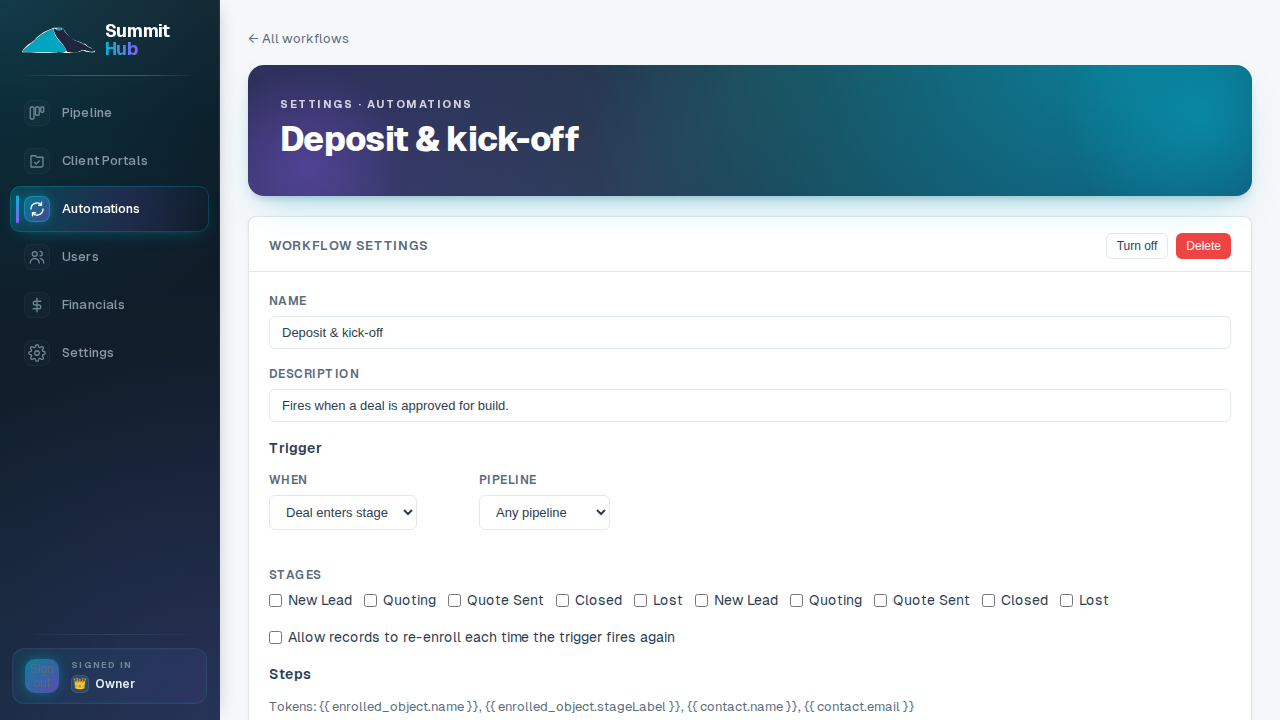
Workflows start from the things that actually happen on a job (a deal entering a stage, a new lead landing, a form submitted) and run a chain of steps you assemble in minutes: send an email, wait, create a task for someone on the crew, update the deal.
- Triggers from your pipeline. Stage moves, new deals and lead-form submissions all start workflows automatically.
- Steps a builder actually needs. Emails from your own address, delays measured in days not cron strings, and tasks assigned to real people.
- Safe to experiment. Workflows start disabled, run only on new events when enabled, and can be switched off instantly.
SECTION · PLANSCompare all plans →
Included in the Company plan
—SoloNot included
—CrewNot included
✓CompanyUnlimited workflows
Stop being the reminder system for your own business.
Automations are the anchor of the Company plan. See what else it includes.
See pricing