
Know Which Jobs Make Money While They're Still Running
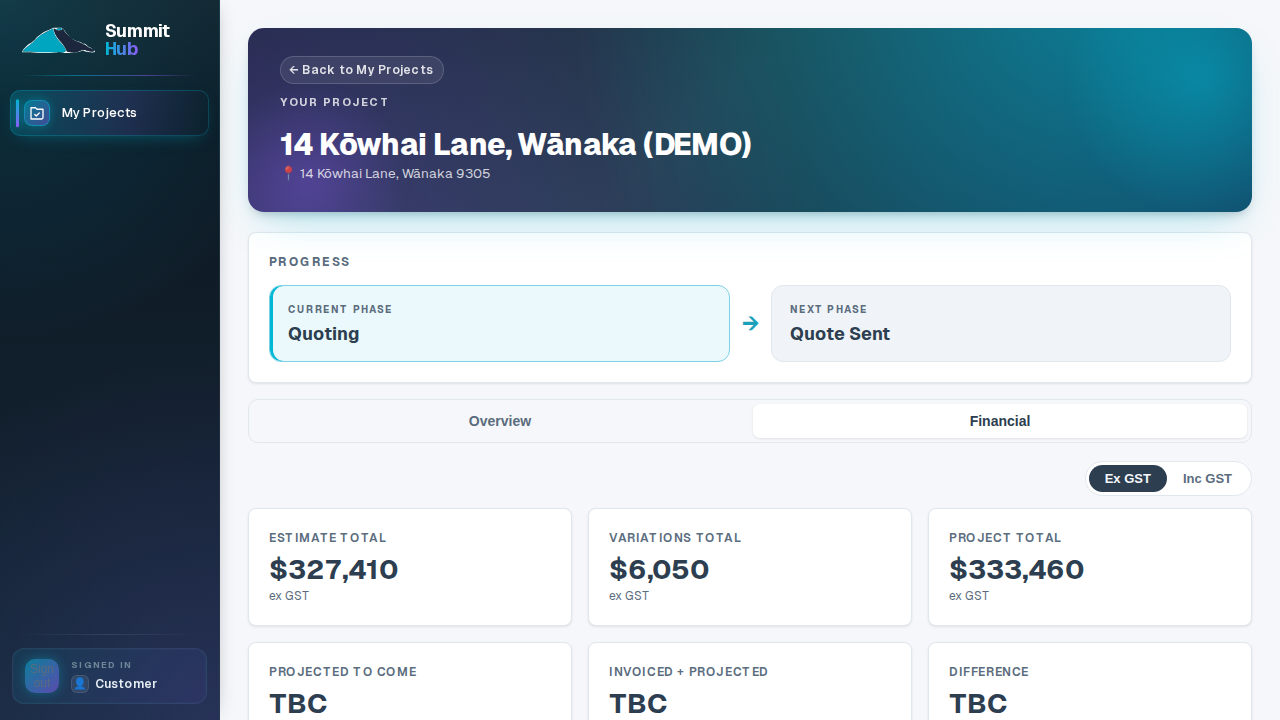
Connect Xero once and every invoice lands against the job it belongs to, category by category. The estimate, the invoiced-to-date and the projected-to-come sit on the same deal, and now the quote is e-signed and on file, the client reads the same chart you do, and you can ask the assistant instead of digging.
Xero (and MYOB, coming) are never paywalled: connect on day one, on any plan.
One job's money trail
From the price you put on it to the margin you took off it: every step on the record.
- QS-01.1The price
Priced from what suppliers charge you now
Estimates draw on your Price Book (your codes, at what suppliers charge you now), updated by import without touching quotes already sent. The P&G rate you set in Settings applies the same everywhere: the estimate, the projections, the work-in-progress forecast.
- QS-01.2The contract
Signed, dated, on file
The quote is e-signed with the signer, timestamp and document hash recorded; the pre-start agreement gates the client's portal until it's signed. No job starts on a handshake, and nothing lives in a drawer.
- QS-01.3The invoices
Every dollar lands on a category
Xero invoice lines are tagged to your cost categories: by hand, in bulk, or automatically by the Xero code rules you set once. Deposits and preliminary fees land where your accountant expects them.
- QS-01.4The drift
Projected-to-come burns down in view
Set the at-completion figure per category and watch what's still to come shrink as invoices land. The category eating your margin shows up this week, not in the month-end pack.
- QS-01.5The client's copy
One set of numbers, both sides of the table
The chart your client reads on their portal is published from the same figures you manage: invoiced against the agreed total, category by category, overspend in red before it becomes an argument.
- QS-01.6The relationship
What a client is worth, on one card
The Client Book keeps lifetime spend, outstanding balance and every deal against each client, and per-property portfolios for the ones who keep coming back.
When the merchant reprices, the next quote wears it, not your margin
Your materials and labour live as codes with the price you pay today. Load the new supplier list and every estimate you build next uses the new numbers, while the quotes you've already sent stay exactly as sent.
- Import, don't re-key. Paste a price list or upload the CSV/XLSX the merchant emails you.
- Sent quotes stay put. A price update changes what you quote next, never what a client already signed.
The Price Book is on every plan.
One estimate, one source of truth for every job
Whether it was built natively or synced from Buildxact, the estimate sits on the deal itself: the same numbers your invoices get checked against, exportable as a clean, versioned Excel workbook whenever you need a record.
- Client-ready Excel export. Turn any estimate into a branded workbook in one click, for lenders, insurers, or your own file.
- Versioned snapshots. Freeze the workbook at deposit, lock-up, handover, and keep the trail of what changed.
Excel export and the version store come with Crew and up.
Your best clients, in numbers
Every synced client with lifetime spend, outstanding balance, deal and job history, and their portal state, so before you price the next job for a repeat client, you know exactly what the relationship is worth.
- Lifetime spend & balance. The whole history, not just the current job.
- Property portfolios. For clients with more than one property, each one's jobs grouped under it.
Client intelligence comes with Crew; property portfolios with Company.
Ask what's uninvoiced, get the number, not a spreadsheet
“What's left in Roofing on the Henderson build?” The assistant reads your live estimates, invoices and schedule through your own permissions and answers with the figure, so the question that used to mean ten minutes in Excel takes the time it takes to type it.
- Your data, your permissions. It sees what your account sees: nothing more, nobody else's.
- Read-only until you say so. Changes it proposes wait on an Approve card naming the exact record.
The AI assistant comes with the Company plan, for your staff only.
Xero is on every plan; cost tracking comes with Crew
The rest of the set
The same job, drawn for the other people holding it.
Grow on numbers you can trust.
Xero, the financial overview and the Price Book are on every plan; cost tracking and the version store come with Crew.
See pricing